Pricing
SuperGrok Pricing: What's Free vs Paid in the Grok App
Grok is free to download and genuinely useful without paying a cent, but its most powerful models sit behind a SuperGrok subscription. Here is exactly what you get for free, what SuperGrok adds, and whether it is worth upgrading.
Yes, Grok has a real free tier
You can download Grok, sign in, and start using it at no cost. The free tier runs on Grok 3 (Fast) and includes chat, real-time answers with DeepSearch, basic Imagine image creation, and Voice and Vision with some limits. For everyday questions, quick research and casual image generation, the free tier covers a lot of ground.
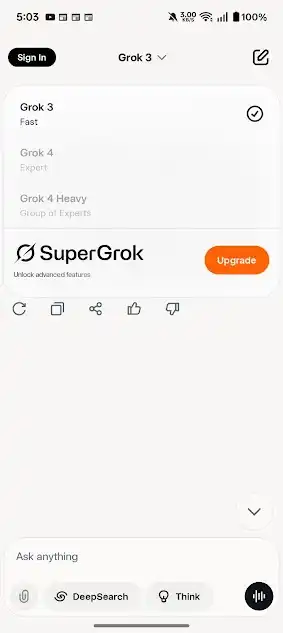
What SuperGrok unlocks
SuperGrok is the paid subscription. As the in-app model selector shows, it unlocks the advanced models and higher usage:
- Grok 4 for stronger reasoning and more reliable answers on hard tasks.
- Grok 4 Heavy, a group-of-experts mode for the most demanding work.
- Higher limits on messages, DeepSearch and media generation.
- Expanded voice options and faster handling of heavy jobs.
Free vs SuperGrok at a glance
| Feature | Free | SuperGrok |
|---|---|---|
| Models | Grok 3 | + Grok 4, Grok 4 Heavy |
| Chat and DeepSearch | Yes, limited | Higher limits |
| Imagine images | Yes, limited | More volume |
| Voice and Vision | Limited | Expanded |
Exact prices and limits can change and may vary by region, so check the current rate inside the app or on grok.com before subscribing. Subscriptions are also available through x.com for X users.
Is SuperGrok worth it?
Upgrade if you rely on Grok daily, do serious coding or research, generate a lot of media, or regularly hit the free limits. The jump to Grok 4 and Grok 4 Heavy is meaningful on hard reasoning and large tasks. Stay free if you mainly ask everyday questions, want occasional images, and rarely run into caps. A sensible approach is to use the free tier for a week, notice where you hit a wall, and only pay once you can point to a specific limit that is slowing you down.
Beware "free premium" claims
How to subscribe (and how to cancel)
You can start SuperGrok from inside the app or on grok.com, and X users can subscribe through x.com. Billing is handled by the store or platform you sign up through, so manage or cancel it in the same place: Google Play subscriptions on Android, your Apple Account on iOS, or your account settings on the web. If you subscribe through one platform, signing in with the same account unlocks the benefits everywhere, so there is no need to pay twice across your devices.
Ways to keep costs down
- Start free and wait. Use the free tier until you can name a specific limit that slows you down.
- Subscribe through one platform only and sign in elsewhere with the same account.
- Turn off automatic video generation so you do not burn limits on clips you did not mean to make.
- Cancel between heavy periods. If you only need Grok 4 for an occasional big project, subscribe for that stretch and cancel after.
Bottom line
Grok gives you a capable assistant for free and a clear, optional upgrade path for power users. Start with the free tier, lean on it, and let your own usage tell you whether SuperGrok earns its place. To begin, see our install guide.
FAQ
Is Grok free?
Yes, Grok has a free tier running Grok 3. SuperGrok unlocks Grok 4, Grok 4 Heavy and higher limits.
Can I get SuperGrok for free?
No. There is no legitimate free way to unlock SuperGrok. Mod APKs that claim to are unsafe and do not work as advertised.