Guide
How to Install Grok APK on Android: A Complete Step-by-Step Guide
Installing Grok on Android takes a couple of minutes. This guide covers both the easy Google Play route and the manual APK or XAPK method, plus how to fix the errors people hit most often, all from hands-on testing.
Get Grok on Google PlayBefore you start
Grok needs Android 9.0 or higher and about 54 MB of free space, with a little extra room for cache and downloaded media. A stable Wi-Fi connection makes the download quick and avoids the corrupted-file errors that interrupted installs can cause. Decide first which route you want: Google Play is the simplest and safest and keeps the app updated automatically, while the manual APK method is for devices or regions where Play is not available.
Method 1: Install from Google Play
This is the route we recommend for almost everyone.
- Open the Google Play Store.
- Search for Grok and confirm the developer listed is xAI.
- Tap Install and wait for the download to finish.
- Open Grok and sign in with Google, Email or X.
That is it. Updates arrive automatically, so you never have to chase new versions.
Method 2: Install the official APK or XAPK manually
If Play is unavailable on your device, you can sideload the official package from a trusted, virus-scanned source. The most important safety step is to verify the package name is ai.x.grok before opening the file.
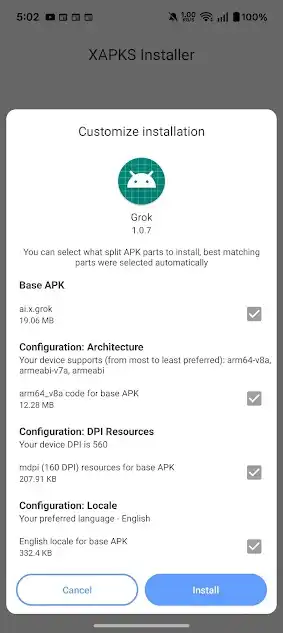
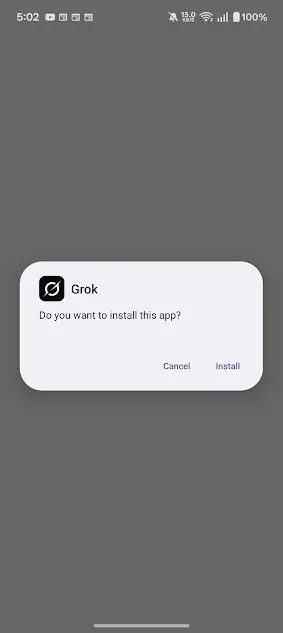
- Download the Grok APK or XAPK file to your device.
- Go to Settings → Apps → Special app access → Install unknown apps, choose your browser or file manager, and allow it.
- Open your File Manager, go to the Downloads folder, and tap the file.
- If it is an XAPK, a helper installer will select the right split parts for your device automatically, then ask you to confirm.
- Tap Install, grant any requested permissions, and wait.
- Open Grok from your home screen and sign in.
When you are done, it is good practice to turn the "Install unknown apps" permission back off for that app, so nothing else can sideload silently later.
What is the difference between APK and XAPK?
An APK is a single Android package. An XAPK is a bundle that contains the base APK plus extra split parts (architecture, screen density and language resources). Modern apps like Grok are often distributed as XAPK so each device gets only the parts it needs, which is why the customize-installation screen shows components such as the arm64-v8a code and your locale.
Fixing common installation problems
"App not installed"
Usually a leftover older copy or a corrupted download. Uninstall any existing Grok, clear your Downloads folder, and download the file again on a stable connection.
"There was a problem parsing the package"
Your device may be below Android 9.0, or the file did not finish downloading. Check your Android version under Settings → About phone, then re-download.
Install blocked by Play Protect
For a genuinely official file you can choose to proceed, but treat this as a reminder to be certain of your source. If you have any doubt, cancel and install from Google Play instead.
App crashes on launch
Clear the app cache in Settings, make sure you have enough free storage, or roll back to the previous version.
Stay safe: avoid mod and premium-unlocked files
You are in
Once installed, the first launch shows the "Understand the universe" splash and three sign-in options. After that you land on the clean "Ask anything" home screen. From here, explore the features or learn what the free tier includes in our SuperGrok pricing guide.